



How to use PGO to improve the performance of .NET programs, .NET 6 began to introduce PGO initially. PGO is Profile Guided Optimization, which guides JIT how to optimize code by collecting runtime information. Compared with the previous without PGO, it can do more optimizations that were difficult to complete before.
Here we use the build version nightly .NET 6 6.0.100-rc.1.21377.6to try new PGO.
PGO tools
.NET 6 provides static PGO and dynamic PGO. The former collects profile data through tools, and then applies it to the next compilation to guide the compiler on how to optimize code; the latter directly optimizes while collecting profile data at runtime.
In addition, since OSR (On Stack Replacement) has been introduced since .NET 5, running functions can be replaced at runtime, allowing the migration of running low-optimized code to highly-optimized code, such as replacing code in a thermal loop.
Tiered compilation and PGO
.NET has officially introduced Tiered Compilation since Core 3.1. When the program starts, JIT first quickly generates low-optimized tier 0 code. Because the optimization cost is small, the JIT throughput is high and the overall delay can be improved.
Then as the program runs, JIT the multiple-invoked method again to generate highly optimized tier 1 code to improve the execution efficiency of the program.
But doing so has almost no improvement in the performance of the program. It only improves the delay and reduces the time for the first JIT. On the contrary, it may cause performance regression due to poorly optimized code. Therefore, I usually turn off hierarchical compilation when developing client-side programs, and turn on hierarchical compilation when developing server programs.
However, after the introduction of PGO in .NET 6, the layered compilation mechanism will become very important.
Since the code of tier 0 is low optimization code, it is more able to collect complete runtime profile data and guide JIT to make more comprehensive optimization.
Why do you say that?
For example, in the tier 1 code, a certain method B is inlined by a certain method A, and the profile collected after calling method A multiple times during operation will only contain the information of A, but not the information of B; another example is in the tier 1 code In, a certain loop is loop cloning by JIT, then the profile collected at this time is inaccurate.
Therefore, in order to maximize the effect of PGO, we not only need to turn on hierarchical compilation, but also need to enable Quick Jit for the loop to generate low-optimized code at the beginning.
Make optimization
Having said so much earlier, how should the PGO of .NET 6 be used, and how will it affect code optimization? Here is an example.
Test code
To create a new .NET 6 console project PgoExperiment, consider the following code:
interface IGenerator
{
    bool ReachEnd { get; }
    int Current { get; }
    bool MoveNext();
}

abstract class IGeneratorFactory
{
    public abstract IGenerator CreateGenerator();
}

class MyGenerator : IGenerator
{
    private int _current;
    public bool ReachEnd { get; private set; }
    public int Current { get; private set; }
    public bool MoveNext()
    {
        if (ReachEnd)
        {
            return false;
        }

        _current++;
        if (_current > 1000)
        {
            ReachEnd = true;
            return false;
        }

        Current = _current;
        return true;
    }
}

class MyGeneratorFactory : IGeneratorFactory
{
    public override IGenerator CreateGenerator()
    {
        return new MyGenerator();
    }
}
How to use PGO to improve the performance of .NET programs
We use IGeneratorFactoryto generate IGenerator, simultaneously achieve a corresponding MyGeneratorFactoryand MyGenerator. Note that the implementation class and not marked sealedthus JIT do not know whether to virtualization (devirtualization), whereupon a check code will honestly virtual tables.
Then we write the test code:
[MethodImpl(MethodImplOptions.NoInlining)]
int Test(IGeneratorFactory factory)
{
    var generator = factory.CreateGenerator();

    var result = 0;
    while (generator.MoveNext())
    {
        result += generator.Current;
    }

    return result;
}

var sw = Stopwatch.StartNew();
var factory = new MyGeneratorFactory();

for (var i = 0; i < 10; i++)
{
    sw.Restart();

    for (int j = 0; j < 1000000; j++)
    {
        Test(factory);
    }

    sw.Stop();
    Console.WriteLine($"Iteration {i}: {sw.ElapsedMilliseconds} ms.");
}
How to use PGO to improve the performance of .NET programs
You may ask why you don’t use BenchmarkDotNet, because the difference between hierarchical compilation and PGO is to be tested here, so the so-called “warm-up” cannot be performed.
Take the test
test environment:
- CPU: 2vCPU Intel(R) Xeon(R) Platinum 8171M CPU @ 2.60GHz
- Memory: 4G
- System: Ubuntu 20.04.2 LTS
- Program running configuration: Release
Do not use PGO
First run with default parameters:
dotnet run -c Release
How to use PGO to improve the performance of .NET programs
got the answer:
Iteration 0: 740 ms.
Iteration 1: 648 ms.
Iteration 2: 687 ms.
Iteration 3: 639 ms.
Iteration 4: 643 ms.
Iteration 5: 641 ms.
Iteration 6: 641 ms.
Iteration 7: 639 ms.
Iteration 8: 644 ms.
Iteration 9: 643 ms.
How to use PGO to improve the performance of .NET programs
Mean = 656.5ms
You will find that Iteration 0 takes a little longer than the others, which is in line with expectations, because at the beginning the low-optimized code of tier 0 is executed, and then as the number of calls increases, the JIT regenerates the highly optimized code of tier 1.
Then we turn off the hierarchical compilation to see what happens:
dotnet run -c Release /p:TieredCompilation=false
How to use PGO to improve the performance of .NET programs
got the answer:
Iteration 0: 677 ms.
Iteration 1: 669 ms.
Iteration 2: 677 ms.
Iteration 3: 680 ms.
Iteration 4: 683 ms.
Iteration 5: 689 ms.
Iteration 6: 677 ms.
Iteration 7: 685 ms.
Iteration 8: 676 ms.
Iteration 9: 673 ms.
How to use PGO to improve the performance of .NET programs
Mean = 678.6ms
There is no difference now, because the tier 1 highly optimized code is generated at the beginning.
Let’s take a look at the JIT dump:
        push    rbp
        push    r14
        push    rbx
        lea     rbp,[rsp+10h]
;   factory.CreateGenerator()
        mov     rax,[rdi]
        mov     rax,[rax+40h]
        call    qword ptr [rax+20h]
        mov     rbx,rax
;   var result = 0
        xor     r14d,r14d
;   if (generator.MoveNext())
        mov     rdi,rbx
        mov     r11,7F3357AE0008h
        mov     rax,7F3357AE0008h
        call    qword ptr [rax]
        test    eax,eax
        je      short LBL_1

LBL_0:
;   result += generator.Current;
        mov     rdi,rbx
        mov     r11,7F3357AE0010h
        mov     rax,7F3357AE0010h
        call    qword ptr [rax]
        add     r14d,eax
;   if (generator.MoveNext())
        mov     rdi,rbx
        mov     r11,7F3357AE0008h
        mov     rax,7F3357AE0008h
        call    qword ptr [rax]
        test    eax,eax
        jne     short LBL_0

LBL_1:
;   return result;
        mov     eax,r14d

        pop     rbx
        pop     r14
        pop     rbp
        ret
How to use PGO to improve the performance of .NET programs
I used comments to mark out the corresponding C# writing in the key places in the generated code, and the C# code is probably like this:
var generator = factory.CreateGenerator();
var result = 0;

do
{
    if (generator.MoveNext())
    {
        result += generator.Current;
    }
    else
    {
        return result;
    }
} while(true);
How to use PGO to improve the performance of .NET programs
There are many interesting things here:
whileCirculation is optimized became ado-whilecycle, do a loop inversion, thereby saving cyclegenerator.CreateGenerator,generator.MoveNextAndgenerator.Currentno inlining- Because there is no inline, JIT cannot see the caller, and it is naturally difficult to virtualize
This was the tier 1 code, that is, at this stage RyuJIT (.NET JIT compiler 6) without the aid of any indication of the compiler Attributeand PGO can generate maximum optimization level code.
How to use PGO to improve the performance of .NET programs
This time, let’s take a look at the results of enabling dynamic PGO.
In order to use dynamic PGO, some environment variables need to be set at this stage.
export DOTNET_ReadyToRun=0 # Disable AOT
export DOTNET_TieredPGO=1 # Turn on layered PGO
export DOTNET_TC_QuickJitForLoops=1 # Enable Quick Jit for loop
How to use PGO to improve the performance of .NET programs
Then run:
dotnet run -c Release
How to use PGO to improve the performance of .NET programs
Get the following results:
Iteration 0: 349 ms.
Iteration 1: 190 ms.
Iteration 2: 188 ms.
Iteration 3: 189 ms.
Iteration 4: 190 ms.
Iteration 5: 190 ms.
Iteration 6: 189 ms.
Iteration 7: 188 ms.
Iteration 8: 191 ms.
Iteration 9: 189 ms.
How to use PGO to improve the performance of .NET programs
Mean = 205.3ms
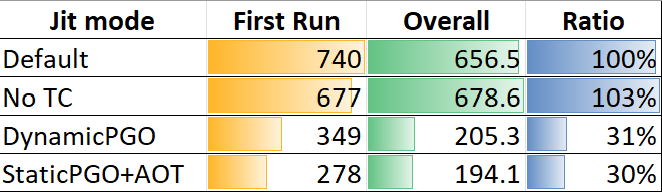
Obtained an amazing performance improvement, using only 31% of the previous time, which is equivalent to a performance increase of 322%.
Then we try static PGO + AOT compilation, AOT is responsible for pre-generating optimized code during compilation.
In order to use a static PGO, we need to install the dotnet-pgotool to generate static PGO data, due to the official version has not been published, it is necessary to add the following nuget Source:
<configuration>
  <packageSources>
    <add key="dotnet-public" value="https://pkgs.dev.azure.com/dnceng/public/_packaging/dotnet-public/nuget/v3/index.json" />
    <add key="dotnet-tools" value="https://pkgs.dev.azure.com/dnceng/public/_packaging/dotnet-tools/nuget/v3/index.json" />
    <add key="dotnet-eng" value="https://pkgs.dev.azure.com/dnceng/public/_packaging/dotnet-eng/nuget/v3/index.json" />
    <add key="dotnet6" value="https://pkgs.dev.azure.com/dnceng/public/_packaging/dotnet6/nuget/v3/index.json" />
    <add key="dotnet6-transport" value="https://pkgs.dev.azure.com/dnceng/public/_packaging/dotnet6-transport/nuget/v3/index.json" />
  </packageSources>
</configuration>
How to use PGO to improve the performance of .NET programs
Installation dotnet-pgoTools:
dotnet tool install dotnet-pgo --version 6.0.0-* -g
How to use PGO to improve the performance of .NET programs
First run the program to collect the profile:
export DOTNET_EnableEventPipe=1
export DOTNET_EventPipeConfig=Microsoft-Windows-DotNETRuntime:0x1F000080018:5
export DOTNET_EventPipeOutputPath=trace.nettrace # Trace file output path
export DOTNET_ReadyToRun=0 # Disable AOT
export DOTNET_TieredPGO=1 # Enable Tiered PGO
export DOTNET_TC_CallCounting=0 # Never generate tier 1 code
export DOTNET_TC_QuickJitForLoops=1
export DOTNET_JitCollect64BitCounts=1

dotnet run -c Release
How to use PGO to improve the performance of .NET programs
Wait for the program to run is complete, we will get a trace.nettracefile, which contains the tracking data, and then use dotnet-pgothe tool to generate PGO data.
dotnet-pgo create-mibc -t trace.nettrace -o pgo.mibc
How to use PGO to improve the performance of .NET programs
So far we have got one pgo.mibc, which contains PGO data.
Then we use crossgen2, AOT compilation of the code under the guidance of PGO data:
dotnet publish -c Release -r linux-x64 /p:PublishReadyToRun=true /p:PublishReadyToRunComposite=true /p:PublishReadyToRunCrossgen2ExtraArgs=--embed-pgo-data%3b--mibc%3apgo.mibc
How to use PGO to improve the performance of .NET programs
You may think that many of the parameters and environment variables in this series of steps are very weird. Naturally, it is because the official version has not been released yet, so the names and parameters have not been standardized.
After compilation, we run the compiled code:
cd bin/Release/net6.0/linux-x64/publish
./PgoExperiment
How to use PGO to improve the performance of .NET programs
Get the following results:
Iteration 0: 278 ms.
Iteration 1: 185 ms.
Iteration 2: 186 ms.
Iteration 3: 187 ms.
Iteration 4: 184 ms.
Iteration 5: 187 ms.
Iteration 6: 185 ms.
Iteration 7: 183 ms.
Iteration 8: 180 ms.
Iteration 9: 186 ms.
How to use PGO to improve the performance of .NET programs
Mean = 194.1ms
Compared with dynamic PGO, it can be seen that the first time is shorter, because there is no need to go through the process of re-JIT after profile collection.
Let’s take a look at what kind of code is generated under the guidance of PGO data:
        push    rbp
        push    r15
        push    r14
        push    r12
        push    rbx
        lea     rbp,[rsp+20h]
;   if (factory.GetType() == typeof(MyGeneratorFactory))
        mov     rax,offset methodtable(MyGeneratorFactory)
        cmp     [rdi],rax
        jne     near ptr LBL_11
;   IGenerator generator = new MyGenerator()
        mov     rdi,offset methodtable(MyGenerator)
        call    CORINFO_HELP_NEWSFAST
        mov     rbx,rax

LBL_0:
;   var result = 0
        xor     r14d,r14d
        jmp     short LBL_4

LBL_1:
;   if (generator.GetType() == typeof(MyGenerator))
        mov     rdi,offset methodtable(MyGenerator)
        cmp     r15,rdi
        jne     short LBL_6
;   result += generator.Current
LBL_2:
        mov     r12d,[rbx+0Ch]

LBL_3:
        add     r14d,r12d

LBL_4:
;   if (generator.GetType() == typeof(MyGenerator))
        mov     r15,[rbx]
        mov     rax,offset methodtable(MyGenerator)
        cmp     r15,rax
        jne     short LBL_8
;   if (generator.ReachEnd)
        mov     rax,rbx
        cmp     byte ptr [rax+10h],0
        jne     short LBL_7
;   generator._current++
        mov     eax,[rbx+8]
        inc     eax
        mov     [rbx+8],eax
;   if (generator._current > 1000)
        cmp     eax,3E8h
        jg      short LBL_5
        mov     [rbx+0Ch],eax
        jmp     short LBL_2

LBL_5:
;   ReachEnd = true
        mov     byte ptr [rbx+10h],1
        jmp     short LBL_10

LBL_6:
;   result += generator.Current
        mov     rdi,rbx
        mov     r11,7F5C42A70010h
        mov     rax,7F5C42A70010h
        call    qword ptr [rax]
        mov     r12d,eax
        jmp     short LBL_3

LBL_7:
        xor     r12d,r12d
        jmp     short LBL_9

LBL_8:
;   if (generator.MoveNext())
        mov     rdi,rbx
        mov     r11,7F5C42A70008h
        mov     rax,7F5C42A70008h
        call    qword ptr [rax]
        mov     r12d,eax

LBL_9:
        test    r12d,r12d
        jne     near ptr LBL_1

LBL_10:
;   return true/false
        mov     eax,r14d
        pop     rbx
        pop     r12
        pop     r14
        pop     r15
        pop     rbp
        ret

LBL_11:
;   factory.CreateGenerator()
        mov     rax,[rdi]
        mov     rax,[rax+40h]
        call    qword ptr [rax+20h]
        mov     rbx,rax
        jmp     near ptr LBL_0
How to use PGO to improve the performance of .NET programs
Similarly, I marked out the corresponding C# code in key places with comments. Because of a little trouble here, I won’t restore the approximate C# logic here.
Similarly, we found a lot of interesting places:
- By determining the type of testing
factorywhetherMyGeneratorFactory,generatorwhetherMyGenerator- If so, a jump to the block, there will be
IGeneratorFactory.CreateFactory,IGenerator.MoveNextandIGenerator.Currentall to virtualization, which is also called guarded devirtualization, and all of the inline - Otherwise, jump to a code block, the code inside is equivalent to the tier 1 code without PGO
- I did a loop cloning here
- If so, a jump to the block, there will be
whileThe loop is also optimizeddo-while, and a loop inversion is done
Compared with not turning on PGO, the optimization range is obviously much larger.
Use a picture to compare the first run, the overall time (milliseconds) and the ratio (the lower the better), from top to bottom are default, hierarchical compilation turned off, dynamic PGO, and static PGO:
Conclusion
With PGO, much of the previous performance experience is no longer valid. The most typical example, with List<T>or Arraytime IEnumerable<T>.Where(pred).FirstOrDefault()than IEnumerable<T>.FirstOrDefault(pred)fast, this is because IEnumerable<T>.Wherethe code level to do a manual targeted to virtualization, but FirstOrDefault<T>no. But with the aid of PGO, even writing code specific to virtualization can be successful without having to manually go virtual, but is not limited List<T>and Array, for all implementations IEnumerable<T>types are applicable.
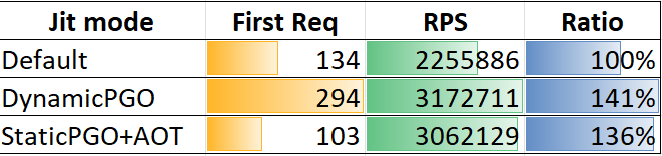
With the help of PGO, we can foresee a substantial increase in execution efficiency. For example, in the plaintext mvc of the unofficial test of TE-benchmark, compare the results of the first request time (milliseconds, calculated from the running program, the lower the better), the RPS (the higher the better) and the ratio (the higher the better) as follows:
In addition, PGO is still in its preliminary stage in .NET 6, and subsequent versions (.NET 7+) will bring more optimizations based on PGO.
As for other JIT optimization aspects, .NET 6 also made a lot of improvements, such as more morphing pass, jump threading, loop inversion, loop alignment, loop cloning, etc., and optimized LSRA and register heuristic, and solved problems. Rarely cause stack spilling of struct so that it remains in the register all the time. But despite this, RyuJIT still has a long way to go in terms of optimization, such as loop unrolling, forward subsitituion, and jump threading that includes relational conditions. NET 6 does not currently have it, and these optimizations will be in .NET 7. Or come later.
this post of How to use PGO to improve the performance of .NET programs reference from: https://www.cnblogs.com/hez2010/p/optimize-using-pgo.html